Ping Pong Example
This tutorial demonstrates how to send a cross-chain message via Hyperlane Protocol.
You'll learn how to:
- Deploy Hyperlane Mailbox-compatible contracts
- Deploy trusted relayer ISM(Interchain Security Module)
- Run a simple relayer
- Send cross-chain messages
We recommend using Hardhat for an easy-to-follow experience.
You can find the contracts and hardhat tasks for deployment and execution in our demo-opl repository.
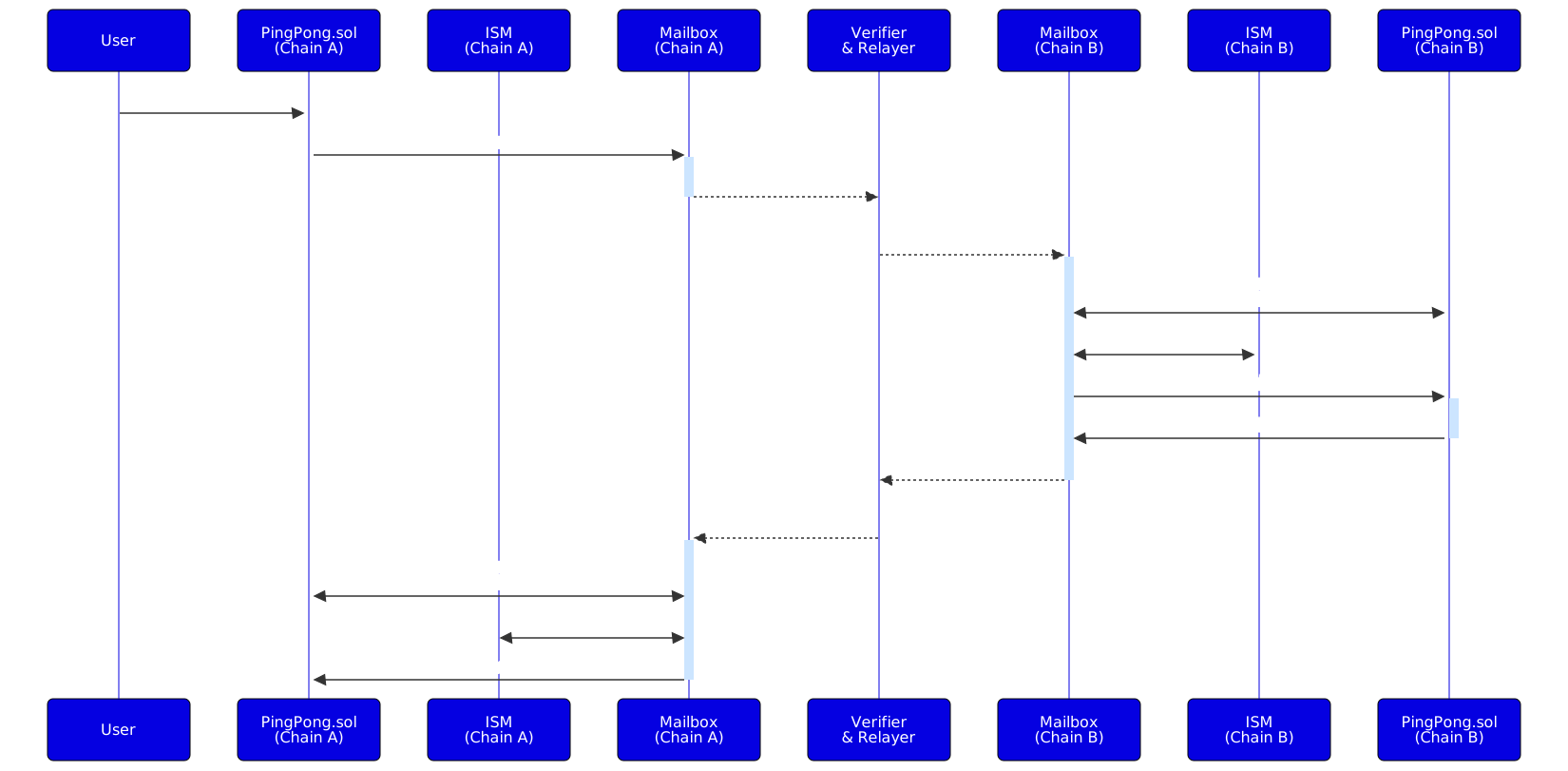
Overview Ping Pong
In this example, you'll deploy a similar contract on two different chains.
The contract on Chain A will send a ping message to Chain B using
Hyperlane Protocol. The contract on Chain B will process this message and
respond with a ping back to Chain A.
Setup
-
Create and navigate to a new directory:
mkdir hyperlane-pingpong && cd hyperlane-pingpong -
Initialize a Hardhat project and install dependencies:
npx hardhat init -
Add
@hyperlane-xyz/coreas dependency:- npm
- pnpm
- Yarn
npm install -D @hyperlane-xyz/corepnpm add -D @hyperlane-xyz/coreyarn add --dev @hyperlane-xyz/core
There can be some problems with dependencies, be sure to have ethers@^6 and
openzeppelin@^4.9.3.
Test Token
Make sure you have enough test token on Arbitrum Sepolia and Sapphire Testnet
Get more:
- TEST tokens for
Sapphire Testnetfrom the Oasis Faucet. - ETH tokens for
Arbitrum Sepoliafrom Alchemy's Faucet.
Add Networks to Hardhat
Open up your hardhat.config.ts and add Arbitrum Sepolia and Sapphire
Testnet.
 import { HardhatUserConfig } from "hardhat/config";
 import "@nomicfoundation/hardhat-toolbox";

 const accounts = process.env.PRIVATE_KEY ? [process.env.PRIVATE_KEY] : [];

 const config: HardhatUserConfig = {
  solidity: "0.8.24",
  networks: {
    'arbitrum-sepolia': {
      url: 'https://arbitrum-sepolia-rpc.publicnode.com',
      chainId: 421614,
      accounts,
    },
    'sapphire-testnet': {
      url: "https://testnet.sapphire.oasis.io",
      accounts,
      chainId: 23295, // 0x5aff
    },
  },
 };

 export default config;
Sapphire only supports evmVersion paris, which is the current default for
Hardhat. Should Hardhat change this, you need to add evmVersion: "paris" to
the solidity config.
Ping Pong Contract
For this example we leverage the Router wrapper from Hyperlane. This results in
following advantages:
- Contracts are compatible with Hyperlane's MailboxClient and IMessageRecipient interfaces.
- Supports enrolling Routers of other chains.
- Supports setting up a custom ISM.
- Create a new file called
Ping.solfor Arbitrum Sepolia - Paste the following contract into it:
Ping.sol Contract
// SPDX-License-Identifier: Apache-2.0
pragma solidity ^0.8.13;

// ============ External Imports ============
import {Router} from "@hyperlane-xyz/core/contracts/client/Router.sol";

/*
* @title Ping
* @dev You can use this simple app as a starting point for your own application.
*/
contract Ping is Router {
    // A generous upper bound on the amount of gas to use in the handle
    // function when a message is processed. Used for paying for gas.
    uint256 public constant HANDLE_GAS_AMOUNT = 50_000;

    // A counter of how many messages have been sent from this contract.
    uint256 public sent;
    // A counter of how many messages have been received by this contract.
    uint256 public received;

    // Keyed by domain, a counter of how many messages that have been sent
    // from this contract to the domain.
    mapping(uint32 => uint256) public sentTo;
    // Keyed by domain, a counter of how many messages that have been received
    // by this contract from the domain.
    mapping(uint32 => uint256) public receivedFrom;

    // ============ Events ============
    event SentPing(
        uint32 indexed origin,
        uint32 indexed destination,
        string message
    );
    event ReceivedPing(
        uint32 indexed origin,
        uint32 indexed destination,
        bytes32 sender,
        string message
    );
    event HandleGasAmountSet(
        uint32 indexed destination,
        uint256 handleGasAmount
    );

    constructor(address _mailbox) Router(_mailbox) {
        // Transfer ownership of the contract to deployer
        _transferOwnership(msg.sender);
        setHook(address(0));
    }

    // ============ External functions ============

    /**
     * @notice Sends a message to the _destinationDomain. Any msg.value is
     * used as interchain gas payment.
     * @param _destinationDomain The destination domain to send the message to.
     * @param _message The message to send.
     */
    function sendPing(
        uint32 _destinationDomain,
        string calldata _message
    ) public payable {
        sent += 1;
        sentTo[_destinationDomain] += 1;
        _dispatch(_destinationDomain, bytes(_message));
        emit SentPing(
            mailbox.localDomain(),
            _destinationDomain,
            _message
        );
    }

    /**
     * @notice Fetches the amount of gas that will be used when a message is
     * dispatched to the given domain.
     */
    function quoteDispatch(
        uint32 _destinationDomain,
        bytes calldata _message
    ) external view returns (uint256) {
        return _quoteDispatch(_destinationDomain, _message);
    }

    // ============ Internal functions ============
    /**
     * @notice Handles a message from a remote router.
     * @dev Only called for messages sent from a remote router, as enforced by Router.sol.
     * @param _origin The domain of the origin of the message.
     * @param _sender The sender of the message.
     * @param _message The message body.
     */
    function _handle(
        uint32 _origin,
        bytes32 _sender,
        bytes calldata _message
    ) internal override {
        received += 1;
        receivedFrom[_origin] += 1;
        emit ReceivedPing(
            _origin,
            mailbox.localDomain(),
            _sender,
            string(_message)
        );
    }
}
- Create a new file called
Pong.solfor Sapphire Testnet - Paste the following contract into it:
Pong.sol Contract
// SPDX-License-Identifier: Apache-2.0
pragma solidity ^0.8.13;

// ============ External Imports ============
import {Router} from "@hyperlane-xyz/core/contracts/client/Router.sol";

/*
* @title Pong
* @dev You can use this simple app as a starting point for your own application.
*/
contract Pong is Router {
    // A generous upper bound on the amount of gas to use in the handle
    // function when a message is processed. Used for paying for gas.
    uint256 public constant HANDLE_GAS_AMOUNT = 50_000;

    // A counter of how many messages have been sent from this contract.
    uint256 public sent;
    // A counter of how many messages have been received by this contract.
    uint256 public received;

    // Keyed by domain, a counter of how many messages that have been sent
    // from this contract to the domain.
    mapping(uint32 => uint256) public sentTo;
    // Keyed by domain, a counter of how many messages that have been received
    // by this contract from the domain.
    mapping(uint32 => uint256) public receivedFrom;

    // ============ Events ============
    event SentPing(
        uint32 indexed origin,
        uint32 indexed destination,
        string message
    );
    event ReceivedPing(
        uint32 indexed origin,
        uint32 indexed destination,
        bytes32 sender,
        string message
    );
    event HandleGasAmountSet(
        uint32 indexed destination,
        uint256 handleGasAmount
    );

    constructor(address _mailbox) Router(_mailbox) {
        // Transfer ownership of the contract to deployer
        _transferOwnership(msg.sender);
        setHook(address(0));
    }

    // ============ External functions ============

    /**
     * @notice Sends a message to the _destinationDomain. Any msg.value is
     * used as interchain gas payment.
     * @param _destinationDomain The destination domain to send the message to.
     * @param _message The message to send.
     */
    function sendPing(
        uint32 _destinationDomain,
        string calldata _message
    ) public payable {
        sent += 1;
        sentTo[_destinationDomain] += 1;
        _dispatch(_destinationDomain, bytes(_message));
        emit SentPing(
            mailbox.localDomain(),
            _destinationDomain,
            _message
        );
    }

    /**
     * @notice Fetches the amount of gas that will be used when a message is
     * dispatched to the given domain.
     */
    function quoteDispatch(
        uint32 _destinationDomain,
        bytes calldata _message
    ) external view returns (uint256) {
        return _quoteDispatch(_destinationDomain, _message);
    }

    // ============ Internal functions ============
    /**
     * @notice Handles a message from a remote router.
     * @dev Only called for messages sent from a remote router, as enforced by Router.sol.
     * @param _origin The domain of the origin of the message.
     * @param _sender The sender of the message.
     * @param _message The message body.
     */
    function _handle(
        uint32 _origin,
        bytes32 _sender,
        bytes calldata _message
    ) internal override {
        received += 1;
        receivedFrom[_origin] += 1;
        emit ReceivedPing(
            _origin,
            mailbox.localDomain(),
            _sender,
            string(_message)
        );
        // send return message
        sendPing(
            _origin,
            string(_message)
        );
    }
}
ISM Contract
In the current state the default ISM of the Arbitrum Sepolia Mailbox won't
accept a message if you send a message from Sapphire Testnet to Arbitrum Sepolia. You can deploy and register a custom ISM on the Arbitrum Sepolia
contract to make it work.
A simple default ISM from Hyperlane is a TrustedRelayerISM, which checks the relayer address before delivering the message.
- Create a new file called
TrustedRelayerIsm.sol - Paste the following contract into it:
TrustedRelayerIsm.sol Contract
// SPDX-License-Identifier: MIT OR Apache-2.0
pragma solidity >=0.8.0;

// ============ Internal Imports ============
import {IInterchainSecurityModule} from "@hyperlane-xyz/core/contracts/interfaces/IInterchainSecurityModule.sol";
import {Address} from "@openzeppelin/contracts/utils/Address.sol";
import {Message} from "@hyperlane-xyz/core/contracts/libs/Message.sol";
import {Mailbox} from "@hyperlane-xyz/core/contracts/Mailbox.sol";
import {PackageVersioned} from "@hyperlane-xyz/core/contracts/PackageVersioned.sol";

contract TrustedRelayerIsm is IInterchainSecurityModule, PackageVersioned {
    using Message for bytes;

    uint8 public immutable moduleType = uint8(Types.NULL);
    Mailbox public immutable mailbox;
    address public immutable trustedRelayer;

    constructor(address _mailbox, address _trustedRelayer) {
        require(
            _trustedRelayer != address(0),
            "TrustedRelayerIsm: invalid relayer"
        );
        require(
            Address.isContract(_mailbox),
            "TrustedRelayerIsm: invalid mailbox"
        );
        mailbox = Mailbox(_mailbox);
        trustedRelayer = _trustedRelayer;
    }

    function verify(
        bytes calldata,
        bytes calldata message
    ) external view returns (bool) {
        return mailbox.processor(message.id()) == trustedRelayer;
    }
}
If you want to read more about Hyperlane's Interchain Security Modules, visit the Hyperlane docs
Key Contract Functions
sendPing: Initiates the cross-chain message by calling Hyperlane'sIMailbox.dispatch.enrollRemoteRouter: In the inheritedRoutercontract, to register the contract from the other chain.setInterchainSecurityModule: Set the ISM for the contract._handle: To handle incoming messages from the Mailbox (internal function called by the inheritedRoutercontracthandlefunction).
Deploying the Contracts
Deploy the Ping and Pong contracts on two different chains: Sapphire Testnet and
Arbitrum Sepolia.
Use for deploying either the provided deploy-pingpong and deploy-ism tasks
or use the scripts below.
Deploying Pong on Sapphire Testnet
-
Create a deployment script
deploypong.tsunderscripts/:deploy.tsimport { ethers } from "hardhat";
async function main() {
// deployed mailbox on Sapphire Testnet
const mailbox = "0x79d3ECb26619B968A68CE9337DfE016aeA471435";
const PongFactory = await hre.ethers.getContractFactory("Pong");
const pong = await PongFactory.deploy(mailbox);
const pongAddr = await pong.waitForDeployment();
console.log(`Pong deployed at: ${pongAddr.target}`);
}
main().catch((error) => {
console.error(error);
process.exitCode = 1;
}); -
Run the deployment:
pnpm hardhat run scripts/deploypong.ts --network sapphire-testnet
Deploying Ping on Arbitrum Sepolia
-
Create a deployment script
deployping.tsunderscripts/:deploy.tsimport { ethers } from "hardhat";
async function main() {
// default mailbox on Arbitrum Sepolia
const mailbox = "0x598facE78a4302f11E3de0bee1894Da0b2Cb71F8";
const PingFactory = await ethers.getContractFactory("Ping");
const ping = await PingFactory.deploy(mailbox);
const pingAddr = await ping.waitForDeployment();
console.log(`Ping deployed at: ${pingAddr.target}`);
}
main().catch((error) => {
console.error(error);
process.exitCode = 1;
}); -
Run the deployment:
pnpm hardhat run scripts/deployping.ts --network arbitrum-sepolia
Deploying ISM on Arbitrum Sepolia
-
Create a deployment script
deployISM.tsunderscripts/:deployISM.tsimport { ethers } from "hardhat";
async function main() {
// default mailbox on Arbitrum Sepolia
const mailbox = "0x598facE78a4302f11E3de0bee1894Da0b2Cb71F8";
const trustedRelayer = "0x<your relayer address>";
const trustedRelayerISM = await ethers.deployContract(
"TrustedRelayerIsm",
[mailbox, trustedRelayer]
);
await trustedRelayerISM.waitForDeployment();
console.log(`TrustedRelayerISM deployed to ${trustedRelayerISM.target}`);
}
main().catch((error) => {
console.error(error);
process.exitCode = 1;
}); -
Run the deployment:
pnpm hardhat run scripts/deployISM.ts --network arbitrum-sepolia
Contracts setup
Enroll Routers
As we use the Router wrapper for our Ping Pong contracts, we need to enroll the contract addresses of the opposite contract.
Enroll Router on Sapphire Testnet
-
Create a file named
enroll.tsin the folder/scriptsenroll.tsimport { ethers } from "hardhat";
async function main() {
let pingpongArbitrum = "0x<your contract deployed before>";
let pingpongSapphire = "0x<your contract deployed before>";
let arbId = "421614";
const signer = await ethers.provider.getSigner();
const contract = await ethers.getContractAt("Pong", sapphireAddr, signer);
await contract.enrollRemoteRouter(arbId, ethers.zeroPadValue(pingpongArbitrum, 32));
const arbRouter = await contract.routers(arbId);
console.log(`remote router adr for ${arbId}: ${arbRouter}`)
}
main().catch((error) => {
console.error(error);
process.exitCode = 1;
}); -
Run the deployment
pnpm hardhat run scripts/enroll.ts --network sapphire-testnet
Enroll Router on Arbitrum Sepolia
-
Create a file named
enroll.tsin the folder/scriptsenroll.tsimport { ethers } from "hardhat";
async function main() {
let pingpongArbitrum = "0x<your contract deployed before>";
let pingpongSapphire = "0x<your contract deployed before>";
let sapphireId = "23295";
const signer = await ethers.provider.getSigner();
const contract = await ethers.getContractAt("Ping", pingpongArbitrum, signer);
await contract.enrollRemoteRouter(sapphireId, ethers.zeroPadValue(pingpongSapphire, 32));
const arbRouter = await contract.routers(sapphireId);
console.log(`remote router adr for ${sapphireId}: ${arbRouter}`)
}
main().catch((error) => {
console.error(error);
process.exitCode = 1;
}); -
Run the deployment
pnpm hardhat run scripts/enroll.ts --network arbitrum-sepolia
Register ISM on Arbitrum Sepolia
-
Create a file named
registerIsm.tsin the folder/scriptsregisterIsm.tsimport { ethers } from "hardhat";
async function main() {
let pingpongArbitrum = "0x<your contract deployed before>";
let ismAddr = "0x<your ISM contract deployed before>";
const signer = await ethers.provider.getSigner();
const contract = await ethers.getContractAt("Ping", pingpongArbitrum, signer);
await contract.setInterchainSecurityModule(ismAddr);
}
main().catch((error) => {
console.error(error);
process.exitCode = 1;
}); -
Run the deployment
pnpm hardhat run scripts/registerIsm.ts --network arbitrum-sepolia
Run Relayer
Before starting to test the Ping Pong, make sure to run a Relayer for Arbitrum Sepolia and Sapphire Testnet.
For information about how to run a Relayer, visit our Relayer page.
Executing Ping Pong
To execute you will call the sendPing function on the Ping.sol contract.
In the demo-opl example you can use the provided send-ping task or you can
use the following script:
-
Create a file named
sendping.tsin the folder/scriptssendping.tsimport { ethers } from "hardhat";
async function main() {
const destChainId = "23295";
const message = "Hello OPL"
const pingpongArbitrum = "0x<your pingpong contract deployed on arbitrum sepolia"
const signer = await ethers.provider.getSigner();
const contract = await ethers.getContractAt("Ping", pingpongArbitrum, signer);
console.log("Calculating fee...");
let fee = await contract.quoteDispatch(
destChainId,
hre.ethers.toUtf8Bytes(message));
console.log(`Fee: ${hre.ethers.formatEther(fee)} ETH`);
console.log("Sending message...");
const tx = await contract.sendPing(destChainId, message, {value: fee});
await tx.wait();
console.log("Message sent");
}
main().catch((error) => {
console.error(error);
process.exitCode = 1;
}); -
Run the script
pnpm hardhat run scripts/sendping.ts --network arbitrum-sepolia
Verify Ping Pong
The most simple way to verify the cross-chain messaging is by checking the
blockchain explorer and check the transaction on your deployed Ping
contract.
If you want to monitor the events directly you can use this script:
-
Create a file named
verifyping.tsin the folder/scriptsverifyping.tsimport { ethers } from "hardhat";
async function main() {
const contractAddr = "0x<your deployed ping contract on arbitrum sepolia>"
const signer = await ethers.provider.getSigner();
const contract = await ethers.getContractAt("Ping", contractAddr, signer);
const spinner = ['-', '\\', '|', '/'];
let spinnerIndex = 0;
const interval = setInterval(() => {
process.stdout.write(`\rListing for event... ${spinner[spinnerIndex]}`);
current = (spinnerIndex + 1) % spinner.length;
}, 150);
let events;
do {
const block = await ethers.provider.getBlockNumber();
events = await contract.queryFilter('ReceivedPing', block - 10, 'latest');
if (events.length === 0) {
await new Promise(resolve => setTimeout(resolve, 60 * 1000));
}
} while (events.length === 0);
clearInterval(interval);
process.stdout.write(`\r`);
process.stdout.clearLine(0);
const parsedEvent = contract.interface.parseLog(events[0]);
const message = parsedEvent?.args?.message;
console.log(`Message received with: ${message}`);
}
main().catch((error) => {
console.error(error);
process.exitCode = 1;
}); -
Run the script
pnpm hardhat run scripts/verifyping.ts --network sapphire-testnet
Troubleshooting
Relayer doesn't relay message
Check:
- You have enrolled the opposite Router contract with
enrollRemoteRouterby callingping.routers(oppositeChainId) - You have set the custom ISM on the
Arbitrum SepoliaPing contract by callingping.interchainSecurityModule - The relayer address matches the trusted ISM configuration.
Can't verify messages
Check:
- Your Hardhat RPC allow historical event queries.
- Use a dedicated RPC provider (e.g., Alchemy) if necessary.